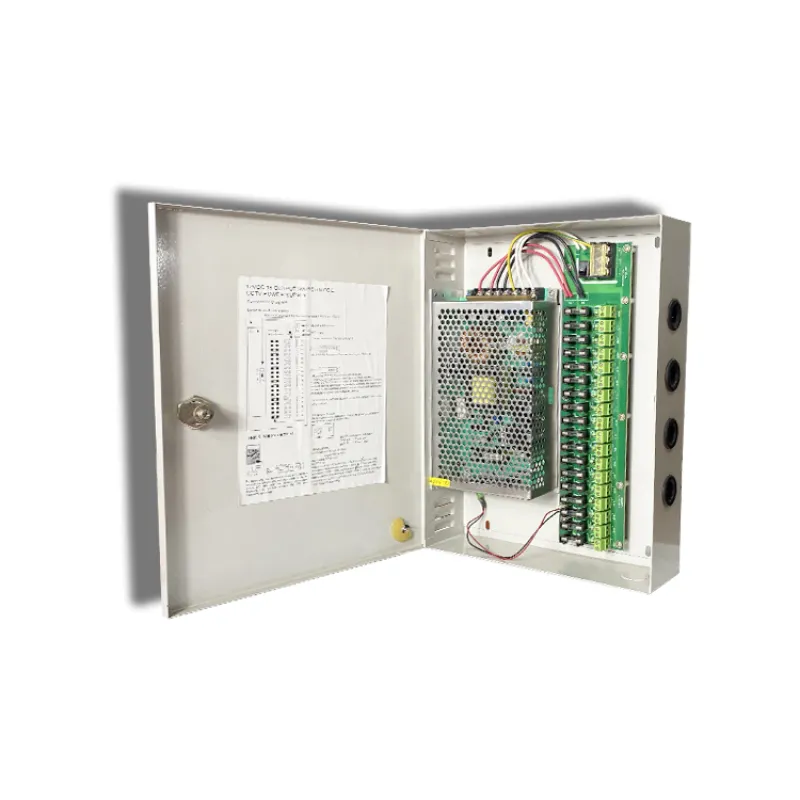

You're quoting a 24-camera job. The bid sheet has cameras, cable, connectors, NVR — and one line that says "power supply, qty 1." The integrator down the street is pricing a cheaper no-name 12V 20A brick. You're looking at a multi-channel distribution box that costs three times as much. Which one wins the bid, and which one calls you back in six months with dead channels, ghost reboots, and a recall?
CCTV power looks simple until it isn't. A single undersized PSU, a cable run that's 10 feet longer than the spec assumed, or a PTZ camera that spikes on pan — any of these will take down a zone and leave the client questioning the whole install. This guide walks through how to size a CCTV power supply properly: camera load math, voltage-drop reality, centralized vs distributed topology, when to add battery backup, and how to pick the right product the first time.
Why CCTV Power Is Different From Generic 12V DC
A CCTV system isn't a single load. It's 4, 8, 16, or 64 small loads, each at the end of its own cable run, each with its own voltage tolerance, each vulnerable to a neighbor's fault.
Three factors make it different from a generic industrial 12V job:
- Distributed loads, shared supply. Cameras are spread across a building — a server room on the ground floor, cameras on the roof, a PTZ in the parking lot 80 meters away. One PSU feeds all of them, but they don't sit side by side.
- Voltage drop matters at the end of the cable. A 12 V camera is usually specced for 10.8–13.2 V input. A long thin cable run can drop a full volt by the time power reaches the camera, and the symptom is a camera that reboots at night when the IR LEDs kick on.
- PTZ cameras spike. A fixed bullet camera pulls a steady 4–8 W. A PTZ camera can triple that during motor acceleration. Sizing to steady-state only is how dealers end up with jobs that work in the daytime demo and crash the first night.
A correctly sized CCTV power supply accounts for all three — steady load, inrush headroom, and cable drop.
Step 1 — Build the Per-Camera Power Budget
Start with the published current draw on the camera spec sheet, not a guess. Typical ranges you'll encounter:
| Camera type | Typical 12 V current | Worst-case current (IR on, recording, PoE negotiation) |
|---|---|---|
| Analog bullet / dome (no IR) | 150–250 mA | 350 mA |
| Analog bullet with IR LEDs | 350–500 mA | 700 mA |
| IP bullet / dome (fixed) | 350–600 mA | 800 mA |
| IP PTZ indoor | 600 mA–1.5 A | 2.0 A |
| IP PTZ outdoor, heater + blower | 1.2–2.5 A | 4.0 A |
| Dome with IR + audio | 450–700 mA | 900 mA |
The worst-case column is the one that matters. Size for the night-time state, not the daytime brochure figure. If the camera has a heater, blower, or defroster, those kick in only below a temperature threshold — but when they kick in, they don't ask permission.
Add the worst-case current of every camera on the zone. That is your aggregate load in amps. Multiply by the nominal DC voltage (12 V or 24 V) to get watts.
Then determine headroom for the project. The example below uses 30% to demonstrate the calculation, not as a universal requirement. Check startup peaks, expansion and temperature derating separately. A larger power rating does not replace the derating curve or permit operation outside the specified environmental limits.
A hypothetical 16-camera mix of 8 fixed bullets (0.5 A each) and 8 IR domes (0.7 A each) at 12 V illustrates the arithmetic. These are example inputs, not measurements of specified cameras:
- Example load: (8 × 0.5) + (8 × 0.7) = 9.6 A; 12 V × 9.6 A = 115.2 W
- With 30% headroom: 115.2 W × 1.30 = 149.76 W, approximately 150 W; startup, branch and temperature requirements still apply
Compare the 9-channel centralized box documentation and 18-channel centralized box documentation by output variant, branch count and temperature conditions. A 120 W variant does not meet the approximately 150 W budget above, and nine terminals do not provide sixteen independently protected outputs. Camera count and a product family's power range alone are insufficient for selection.
Step 2 — Do the Voltage Drop Math on Your Longest Run
This is the single most common field failure on CCTV installs. The PSU is fine. The cameras are fine. The install reboots at 2 a.m. when IR LEDs flip on, and nobody can reproduce it during the day.
Cause: voltage drop over the power cable. Twelve volts at the PSU becomes 10.6 V at the camera, the IR LED bank pushes current up by 250 mA, the voltage sags to 10.2 V, the camera's brownout detector fires, the camera reboots.
The math:
V_drop = I × R × 2 × L
where I is the current (amps), R is the cable resistance per foot (or per meter) in ohms, L is the one-way run length, and the ×2 accounts for the return leg. For a 22 AWG CCTV power lead carrying 500 mA over a 50 m run:
- 22 AWG resistance ≈ 0.053 Ω/m
- V_drop = 0.5 × 0.053 × 2 × 50 = 2.65 V
That's a 12 V rail arriving as 9.35 V. Camera is offline.
Three corrections once you see this on a plan:
- Use thicker cable. Drop from 22 AWG to 18 AWG and the same run drops 1.05 V instead of 2.65 V.
- Consider 24 V only when the device explicitly supports it. At equal power and cable resistance, ignoring conversion losses, 0.5 A at 12 V becomes 0.25 A at 24 V. Absolute
I × Rvoltage drop halves; drop as a percentage of nominal voltage becomes one quarter, as does cableI²Rloss. Never connect a 12 V-only camera directly to 24 V. AC, DC and PoE inputs are not interchangeable. - Place the PSU closer. Split the system into two zones with two smaller centralized boxes instead of one big one 70 m from the far cameras.
Rule of thumb: keep voltage drop under 5% of nominal (0.6 V on a 12 V rail, 1.2 V on 24 V). Above 10% and you will have nightly problems you cannot reproduce during a service call.
Step 3 — Pick the Topology: Centralized vs Distributed
Centralized power. One PSU (or one multi-channel distribution box) in the equipment room feeds every camera on individual home-runs. This is what 90% of commercial CCTV installs use. Advantages: one place to service, one place to back up with a UPS, one bill of materials, clean documentation. Disadvantage: long cable runs, which is exactly why the voltage-drop math above matters.
Distributed power. A local wall-wart adapter at every camera location. Advantages: short cable runs, no voltage drop, trivially easy to add a camera. Disadvantages: 16 failure points instead of 1, nobody remembers which adapter feeds which camera at 3 a.m., and every outlet you plug into needs a surge-protected circuit.
Hybrid. A centralized box per floor or per building wing, fed from the main panel, with home-runs inside the zone. This is how most medium-and-up integrators build today. A 5-channel box like the SD-CH5 series (36W–72W) handles a small zone or a single building wing; stack several across a multi-floor building and you have clean zone isolation without hand-soldering 64 wall adapters.
If you're bidding single-family residential, distributed can be the right call. If you're bidding commercial, retail, warehouse, or public-sector work, default to centralized.
Step 4 — Decide If You Need Battery Backup
Define the function that must survive an outage before selecting backup power. Continuous NVR recording requires the cameras, necessary network switches or PoE equipment, the NVR and any other essential network devices to remain powered. Backing up the NVR alone cannot keep unpowered cameras transmitting. Camera-only backup does not guarantee NVR recording, although cameras with local storage may still record at the edge.
Battery backup does matter when:
- The NVR is already on UPS and you want cameras to keep recording through outages
- Intrusion detection triggers on camera loss — some monitoring centers treat a camera blackout as a panic event, and you'd rather ride through a 30-second utility blip than dispatch police
- Liability-sensitive installs — banks, cannabis dispensaries, pharmacies, any site where gaps in footage become legal exposure
- Critical infrastructure and access control — access control panels and CCTV on the same circuit need to stay up during outages, not reboot during them
Compare DC supplies with battery management against an upstream UPS feeding the centralized box. For mixed access-control and CCTV projects, review the MJ access-control supply, then confirm the specific variant's battery interface, charging requirements and supplied components; do not assume a particular battery capacity is included. For AC backup such as a standby UPS, budget the entire recording chain and check tolerated transfer time and required runtime. Having an NVR alone does not determine the appropriate UPS topology. Share your system backup requirements with our team to confirm available models and configurations.
Step 5 — Certifications, Enclosure, and Field Ruggedness
For CCTV installs sold into commercial, retail, and government projects, the PSU almost always needs to show:
- CE / FCC — baseline for EU and U.S. commercial sale
- 3C (China Compulsory Certification) — required for mainland China installs
- RoHS — environmental compliance, demanded by most procurement teams
- UL — strongly preferred for U.S. commercial and any AHJ-inspected project
For outdoor or semi-outdoor installs (parking lots, building exteriors, loading docks), the distribution box itself should be housed in a weather-rated enclosure — or the PSU should carry its own IP rating. If you're not sure what rating you need, see our IP65 vs IP67 vs IP68 waterproof power supply selection guide.
Branch protection must be verified together with the upstream supply. A fuse does not guarantee uninterrupted operation on other channels: check its time-current curve, healthy-channel terminal voltage and recording continuity during the fault. See our CCTV branch fault-isolation test guide (Chinese) for a structured acceptance checklist.
Common Mistakes We See on Bids
- Sizing to nameplate, not worst-case. A 12 V 10 A PSU feeding ten cameras at 0.9 A each (nameplate) works on paper and fails the first cold night when IR + heater pushes the real draw to 1.3 A each.
- Running 24 AWG alarm cable for camera power because it was cheap. Fine for 10 m runs. Catastrophic at 60 m.
- Mixing 12 V and 24 V cameras on the same distribution box. Most centralized boxes are single-voltage output. Read the datasheet.
- Relying on the NVR's built-in camera power outputs. NVR PoE ports are fine for small installs. For anything over 8 channels, or anywhere you need external pan/tilt/zoom, use a proper PSU.
- Omitting essential recording-chain devices from the backup budget. Continuous NVR recording needs cameras, essential networking and the NVR to operate together. Include a monitor when continued local viewing is required. Verify edge recording and NVR recording separately.
Product Selection Cheat Sheet
| Install size | Cameras | Recommended topology | Sanyi product |
|---|---|---|---|
| Residential / small retail | 1–4 | Distributed adapters or small centralized box | 5-channel centralized box (36W–72W) |
| Small commercial / mid-size retail | 5–9 | Centralized box | 9-channel centralized box (48W–120W) |
| Large commercial / multi-zone | 10–18 | Large centralized box with per-channel fuses | 18-channel centralized box (120W–200W) |
| Access control + CCTV zone | Mixed | Power box with battery port | MJ access-control PSU (60W) |
| High-power feeder / NVR cabinet | N/A | Dedicated enclosed PSU | SFY-Z switching PSU 240W–480W or SZ industrial switching PSU 240W–480W |
| CCTV + room-level backup | Any | Upstream UPS feeding centralized box | Discuss system backup requirements; confirm the model for the actual conditions |
FAQ
Q: How many cameras can I run off a single 12V 10A power supply? A: The arithmetic answer is "however many fit in 10 A with headroom." In practice that's 10–12 fixed bullet cameras (0.5–0.7 A each, with 30% margin) or 4–5 PTZ cameras. Don't trust the arithmetic blindly — run the voltage-drop math on the longest cable first. If any run drops more than 0.6 V on a 12 V rail, either move to 24 V, upsize the cable, or split into two smaller power zones.
Q: Should I use 12V DC or 24V AC for CCTV cameras? A: Modern IP cameras almost all accept 12 V DC, and many accept a 12–48 V range (usually over PoE). 24 V AC is a legacy analog-camera standard and is still seen on older installs. The practical advantage of 24 V (AC or DC) is lower voltage drop on long cable runs. If you're designing fresh today, 12 V DC is the mainstream choice, with PoE recommended for IP cameras wherever the switch can support it. See our PoE power budget and switch sizing guide for the PoE side.
Q: Do I need a UPS for CCTV cameras, or is it enough to put the NVR on UPS? A: Continuous NVR recording requires the cameras, necessary switches or PoE equipment, and the NVR to remain powered. A UPS on the NVR alone preserves the recorder's power but cannot record video from unpowered cameras. If only camera-local storage is required, verify that edge-recording function separately. Test runtime and transfer behavior for the actual recording chain.
Q: What certifications should a commercial CCTV power supply carry? A: At minimum: CE, FCC, and RoHS for most Western markets. UL 60950 or UL 62368 is strongly preferred for U.S. commercial installs. 3C for mainland China. Individual per-channel fuses are not a certification but should be on the spec sheet. For outdoor installations, verify the enclosure IP rating — indoor-rated centralized boxes installed outdoors without a weatherproof cabinet will corrode within a season.
Q: How far can I run 12V DC power to a security camera?
A: It depends entirely on current and cable gauge. A 500 mA camera on 18 AWG wire is good for ~80 m before voltage drop becomes a problem. The same camera on 22 AWG is limited to ~30 m. As a rule: anything past 30 m on thin cable should either move to 24 V, go PoE, or get a local power drop. Don't guess — run V_drop = I × R × 2 × L before committing to a cable plan.
Closing Notes
A CCTV power supply spec isn't a line item. It's the difference between a system that works through its warranty and one that generates after-hours service calls. Size to worst-case current, run the voltage-drop math, pick centralized topology for anything over 4 cameras, and verify per-channel fuses on the box you select. Most field failures we see are one of five mistakes from the list above — all of them preventable at the bid stage, none of them forgivable at the punch list stage.
If you're specifying a power supply for an upcoming install and want a sanity check on your load math or cable plan, contact us with the camera count, voltage, and longest cable run — we'll point you at the right product or tell you your plan needs revision before you buy parts.